
UK Ads Watch Register and Login | UK Ads Earning 2026
Getting started on the UK Ads Watch app requires setting up your profile and activating your digital business card before you can access daily tasks. Whether you are a new user trying to sign up for the first time or an existing member looking to sign in to your dashboard, following the proper steps avoids account delays and login errors.
This guide walks you through the complete UK Ads registration process, the 699 PKR account activation steps, and how to log in smoothly from your Android device.
Requirements Before You Register
Before opening the registration form on the UK Ads app, keep these basic details ready so you can complete the signup process in one go:
- Android Device: A smartphone with the UK Ads Watch APK installed and a stable internet connection.
- Personal Details: Your full name, an active email address, and a working WhatsApp phone number.
- Referral Code: An optional sponsor or invite code if a friend referred you to the platform.
- Payment Method: An active Easypaisa or JazzCash account with at least 699 PKR to pay the one-time activation fee.
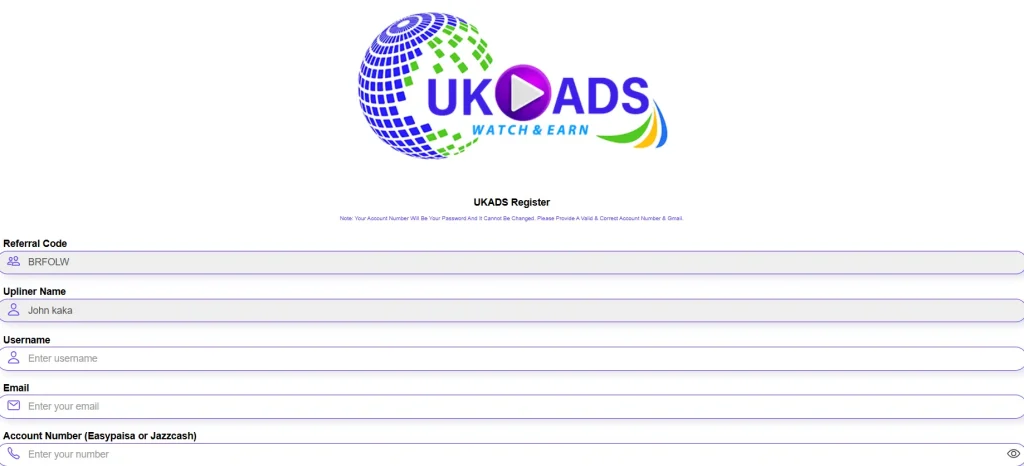
How to Complete UK Ads Watch Registration
Creating your profile takes only a few minutes. Follow these steps to register and activate your earning account:
- Open the App or Website: Launch the UK Ads Watch app on your Android phone or visit the official registration page.
- Tap on Register: On the main welcome screen, select the Register or Sign Up option to open the signup form.
- Fill in Your Profile Information: Enter your full name, active email address, and working WhatsApp number in the required fields.
- Create a Password: Set a strong password that you can remember easily. If someone invited you, enter their referral code in the sponsor box.
- Submit the Signup Form: Review all your details carefully to avoid spelling errors, then tap Register Now to create your account.
- Pay the 699 PKR Activation Fee: To receive your UK Business Card and unlock earning features, transfer the one-time 699 PKR fee via Easypaisa or JazzCash to the account number shown on the payment screen.
- Submit Your TRX ID and Receipt: Copy the Transaction ID (TRX ID) from your payment confirmation message, enter it into the verification box along with a screenshot of the receipt, and tap submit.
- Wait for Admin Verification: The support team will review your payment proof. Once verified, your account status becomes active and your earning dashboard unlocks.
UK Ads Login Process
After your account activation is approved, you can sign in anytime to watch daily ads, track referrals, and check your wallet balance:
- Launch the App: Open the UK Ads Watch app on your smartphone or go to the official login page.
- Select Login: Tap the Login button on the main screen.
- Enter Your Credentials: Type your registered email address or phone number into the username field, followed by your account password.
- Access Your Dashboard: Tap Login to open your main user panel and start your daily tasks.
Common Registration & Login Problems and Fixes
If you run into trouble while signing up or logging in, check these common issues and their solutions:
Account Shows Inactive After Payment
Your account remains inactive until the admin team verifies your 699 PKR payment receipt. If several hours have passed since you submitted your TRX ID, contact official WhatsApp support with your registered phone number and payment screenshot so they can manually review it.
Invalid Username or Password Error
Check that your mobile data or Wi-Fi connection is working properly. Re-type your email address and password carefully, making sure your phone keyboard has not added extra spaces at the end or turned on automatic capitalization.
Forgot Account Password
If you cannot remember your login password, tap the Forgot Password link on the login screen and enter your registered email address to receive reset instructions. If you do not receive an email, message the official support helpline with your registered WhatsApp number and activation TRX ID to recover access.
Registration Form Not Submitting
Make sure you have filled in every mandatory field and used an email address and phone number that have not already been registered on the platform. Clearing the app cache in your phone settings or switching from mobile data to Wi-Fi often fixes form loading issues.
Tips to Keep Your Account Safe
- Save Your Payment Receipt: Always keep a screenshot of your 699 PKR Easypaisa or JazzCash transaction receipt until your dashboard is fully active.
- Use Accurate Details: Register with your real name and active WhatsApp number so support can verify your identity quickly if you ever lose access.
- Protect Your Login Info: Never share your account password, email login, or mobile wallet PIN codes with anyone in WhatsApp groups.
Conclusion
Completing your UK Ads Watch registration and login is a straightforward process once you have your personal details and 699 PKR activation payment ready. Always double-check your email, password, and transaction ID before submitting any form so your account activates without delays. Once logged in, keep your credentials secure and explore your dashboard to start watching daily ads and building your referral network. for more information visit the HOME page